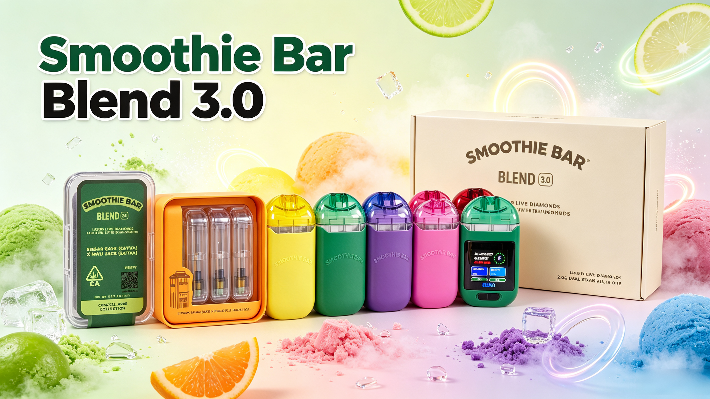
The Smoothie Bar Blend 3.0 belongs to the advanced generation of Smoothie Bar dual-chamber hardware. Featuring a modern 2-in-1 design, two separate tanks, and an integrated LED display, it offers enhanced technical specifications compared to the original Smoothie Bar model. At the same time, flashing indicator lights or unusual displays on electronic vaping devices can sometimes raise questions.
What does it mean when the Smoothie Bar Blend 3.0 vape flashes? Is it due to a low battery, a charging issue, or perhaps a technical malfunction? The correct interpretation depends on the specific hardware and its control electronics.
In this guide, we explain the most common potential causes for a flashing vape light, outline practical steps for technical troubleshooting, and detail the improvements offered by the Smoothie Bar Blend 3.0 as an upgrade.
1. What Does a Blinking Light on the Smoothie Bar Blend 3.0 Mean?
A flashing light on an electronic vape device generally indicates that the electronics are signaling a specific operating state. Not every instance of flashing automatically means that the device is faulty.
On modern devices with an LED display, various indicators can convey different information—for example, the battery level, the charging status, or an activated protective function.
Possible meanings include:
- Low Battery: The built-in battery may no longer have enough power for normal operation.
- Charging Status: The indicator signals that a charging process is active.
- Protection Mode: An electronic protection function may temporarily interrupt operation.
- Connection Issues: A malfunction within the electronic components or connections can trigger an error message.
- System Malfunction: A technical defect can also lead to unusual light signals.
It is important to note that LED flash codes are not uniform across all vape models. The number, color, and duration of the flashes can vary depending on the manufacturer and the hardware platform. Therefore, users should refer to the specific manufacturer instructions for the Smoothie Bar Blend 3.0, rather than applying general flash codes from other devices.
2. Common Reasons Why Your Smoothie Bar Blend 3.0 Vape Light Is Blinking
If the Blend 3.0 smoothie bar displays unusual light signals, there are several possible technical causes. The following points will help you better identify potential sources of the issue.
Low Battery or Insufficient Power
A low battery level is one of the possible reasons for flashing indicators on rechargeable vape devices.
The Blend 3.0 smoothie bar features a built-in rechargeable battery. If the available voltage is no longer sufficient, the electronic control system may restrict operation or display an appropriate warning.
Checking the battery indicator on the display can help you verify the charge level. If the indicator shows a low battery capacity, you should first consult the charging instructions provided by the manufacturer.
Charging Port or Cable Problems
Problems during the charging process can also cause unusual LED signals.
Possible causes are:
- A damaged or unsuitable charging cable
- Debris in the charging port
- An unstable power supply
- Moisture in the area of the connection
- Damage to the charging electronics
The Blend 3.0 smoothie bar features a USB-C charging port, which allows for a convenient connection to a suitable power source. However, the presence of a USB-C port does not automatically mean that every charger is compatible with the device.
Electronic Protection Mechanisms
Modern vape hardware can feature electronic protective functions that detect unusual operating conditions.
Depending on the technical design, such protective mechanisms can react to, for example, electrical irregularities, overheating, or issues within the heating system.
If the device flashes repeatedly and fails to function normally, this indication should not be ignored. An accurate diagnosis is only possible by referring to the model-specific information provided by the manufacturer.
Internal Component or Connection Issues
The Blend 3.0 smoothie bar combines several electronic and mechanical components within a compact housing.
These include, among others:
- Integrated lithium-ion battery
- Electronic control
- LED display
- Heating components
- Two separate tank areas
- Internal electrical connections
If one of these components is damaged or not functioning properly, it can affect the device display.
Particularly in the case of more electronically complex dual-chamber systems, careful quality control is important to ensure that the individual components work together reliably.
3. How to Troubleshoot Smoothie Bar Blend 3.0 Vape Light Blinking
If the Blend 3.0 smoothie bar is flashing, the investigation should be carried out systematically. The following steps will help distinguish simple external causes from potential technical defects.
Step 1: Check the battery status
First, check the battery indicator on the LED display.
When the battery level is low, follow the manufacturer’s charging instructions. An insufficiently charged battery can impair the normal operation of the electronic control system.
Step 2: Inspect the USB-C Charging Connection
Check the USB-C cable and the charging port for any visible damage or debris.
Use only a suitable power supply in accordance with the manufacturer's specifications. A damaged cable or a damp connection should not continue to be used.
Step 3: Observe the LED display
Pay attention to when the flashing occurs:
- Immediately upon switching on
- During the charging process
- In the case of an operating indicator
- Immediately before an interruption in device operation
This information can help technical support narrow down the potential cause of an issue.
Step 4: Check for Visible Damage
Inspect the housing and the charging port for any visible damage.
A device showing visible damage, unusual heat generation, deformation, or moisture should not be used or charged any further.
Step 5: Contact Your Hardware Supplier
If the indicator continues to flash in an unusual manner or the device does not function properly, you should refrain from further use.
Contact the supplier and, if possible, provide the following information:
- Model designation
- Order or batch number
- Description of the flashing behavior
- Time of occurrence
- Photos or videos of the ad
A structured description of a fault facilitates technical assessment and can help identify recurring issues within a production batch.
4. Smoothie Bar vs. Smoothie Bar Blend 3.0: What Has Been Upgraded?
The Smoothie Bar Blend 3.0 is an evolution of the original Smoothie Bar hardware. It focuses on a more modern device architecture and an expanded feature set.
The combination of dual-chamber technology and a digital display is particularly interesting.
Upgraded 2-in-1 dual chamber design
A key feature of the Blend 3.0 is its 2-in-1 design.
The device combines two separate tank sections within a single housing. This distinguishes its hardware from conventional single-chamber systems.
The dual-chamber design offers brands and OEM clients additional possibilities when developing customized product concepts.
Integrated LED display
Another important difference is the integrated LED display.
Compared to simple indicator lights, a screen can display multiple pieces of information in a clear, organized manner, provided that the device's electronics support this.
These may include, for example:
- Battery status
- Charging information
- Device Status
- Preheat Status
The exact display and functionality depend on the specific hardware version.
Preheat Function and Modern Electronics
The integrated preheat function is also among the features of the Smoothie Bar Blend 3.0.
Together with the modern control system, it expands the technical capabilities compared to simpler hardware platforms.
Particularly in a dual-chamber system, the coordination between the battery, control electronics, and heating components is a key factor in product quality.
5. Why Hardware Quality Matters for Stable LED Performance
A modern vape with an LED display requires more than just an attractive exterior design. The quality of the electronic components and how well they are calibrated determine the reliability of the entire device.
For manufacturers, brands, and wholesalers, several factors are therefore crucial.
Battery and Electronic Component Quality
The battery is a central component of rechargeable hardware.
A reliable power supply and an appropriate electronic control system are important for stable device operation.
The quality of internal connections and the electronic components used should also be taken into account during product development.
Consistent Manufacturing and Quality Inspection
For larger hardware orders, consistent product quality is particularly important.
Professional quality control should, among other things, take the following areas into account:
- Charging function and electrical connections
- Function of the LED display
- Response of the electronic control system
- Casing construction
- Tightness of the tank areas
- Consistency between individual production batches
A systematic check prior to shipment can help identify potential quality issues at an early stage.
Complete packaging and reliable supply
In addition to technical quality, packaging and delivery capability also play an important role.
For B2B customers, complete product packaging, appropriate accessories, clear product specifications, and reliable shipping scheduling are important criteria when selecting a hardware supplier.
6. Where to Source Smoothie Bar Blend 3.0 Empty Vape Hardware in Bulk?
For brands, importers, and wholesalers, selecting a reliable hardware supplier is an important component of their procurement strategy.
The Blend 3.0 smoothie bar combines a modern dual-chamber concept with an LED display and a preheat function. For companies interested in this hardware platform, the following features are particularly relevant:
- 2-in-1 Dual-Chamber Design
- Two separate tank areas
- Integrated LED display
- Preheat function
- Rechargeable hardware
- Professional packaging options
At Leerervape, the focus is on empty vape hardware for B2B clients. The product range includes modern dual-chamber devices, hardware with LED displays, and customized OEM/ODM solutions.
As a manufacturer and wholesale partner, we prioritize thorough product inspections, comprehensive packaging solutions, and reliable order processing.
If you are interested in Smoothie Bar Blend 3.0 empty vape hardware, you can contact our team to request the latest product specifications, packaging details, minimum order quantities, and wholesale pricing.
Frequently Asked Questions About Smoothie Bar Blend 3.0 Vape Light Blinking
Why is my Smoothie Bar Blend 3.0 vape light blinking?
A flashing light may indicate a low battery level, a charging error, an activated protective function, or a technical malfunction. The exact meaning depends on the specific hardware version and the manufacturer's specifications.
Does a blinking light always mean the battery is low?
No. A flashing light can indicate various operating states or warning messages. Therefore, one should not automatically assume that the battery is empty.
Can a charging problem cause the LED to blink?
Yes. A damaged charging cable, a dirty port, or an unsuitable power supply can cause charging issues with electronic devices.
What is the difference between Smoothie Bar and Smoothie Bar Blend 3.0?
The Blend 3.0 is the evolved version of the Smoothie Bar hardware. Its standout features include a 2-in-1 dual-chamber design, two separate tank sections, an integrated LED display, and a preheat function.
What should I do if my Smoothie Bar Blend 3.0 keeps blinking?
If the flashing persists despite checking the external connections and the manufacturer's instructions, the device should no longer be used. Contact the supplier and provide information regarding the model and the nature of the malfunction.
Where can I buy Smoothie Bar Blend 3.0 empty hardware wholesale?
B2B clients can reach out to specialized suppliers of empty vape hardware, such as Leerervape, to obtain information regarding product configurations, packaging options, MOQs, and wholesale pricing.
Conclusion
The search for "smoothie bar blend 3.0 vape light blinking" highlights the importance of clear technical information for modern vaping hardware. A blinking light can have various causes—ranging from a low battery level to issues with the charging connection or electronic components.
As an upgrade to the original Smoothie Bar, the Blend 3.0 combines a modern 2-in-1 dual-chamber design with an LED display and a preheat function. These advanced features make the coordination and quality control of the individual hardware components especially important.
When selecting empty vape hardware, brands and wholesalers should therefore consider not only product design but also technical reliability, production quality, complete packaging, and a stable supply chain.
Leerervape supports B2B clients with modern empty vape hardware solutions, professional packaging options, and OEM/ODM services. Contact us to learn more about the Smoothie Bar Blend 3.0 and our wholesale offerings.
Attention : smoothie bar 3.0 2g vape | wholesale smoothie bar vape | dual chamber disposable vape | custom vape
 empty 1g vape
 empty 2g vape
 empty 3g vape
 empty dual chamber vape
 empty led vape
 USA STOCK VAPE
 EU German stock vape